Showing posts with label Facebook Tricks. Show all posts

Tuesday, 15 March 2016

Posted by Haxor On 03:12

Today i am going to share Ghost Id symbol with you

Aoa Frinds From Farhan Rg

1. ら
2. こ
3. で
4. す
5. り
6. ぴ
7. っ
8. タ
9. イ
10. メ
11. イ
12. ク
13. ラ
14. ル
15. う
16. ナ
17. ブ
18. ヘ
19. ア
20. ー
21. に
22. ち
23. ゃ
24. ភភ ភភ
25. Կ. Ձ. Օ.
26. ლლ ლლ
27. ツ ツ
28. ΞΔ ΞΔ
29. װוןױ ױװױ
30. ﱞﱞ ﱞﱞ ﱞﱞ ﱞﱞ
31. ი. ღ. ი
32. Ձ.Օ. լ.ճ 33.  І. Ч. З.
34. Յ. Օ. Ձ.
35. Դ.Ց. ճ
36.  ҈
37. ジ气覀 气亠 亠 
38. 흟흟흟흟
39. ϕϕ
39. ථථ
40.
Now paste which you want and make a Ghost id
Posted by Haxor On 02:45
I am Back With New Trick :D
Now A Days u Have Seen Some Idz As Mention Below in Picture

How To Make Stylish JunGle Name on Facebook Account 2016. . .


  1. This Is  Account Have Branches Of Symbols In Its Name There For It Is Called Jungle Name Id :P                                                                  
  2. Ok now i will tell uu how to set this name in ur profile and how to         
  3. Make this name                                                                                                                                                                                
  4. First Go To This Link nd write Ur Name 


 now for setting this name on ur account just use spain proxy from any proxy changer....
paste ur name in 1st and last name save it nd enjoy....
Note:use Spain Proxy for this purpos otherwise ur name will not be change....
Thank U keep visiting my blog for new awsome tricks......   

Saturday, 3 October 2015

Posted by Haxor On 13:44

How To Accept Facebook Friend Request All At Once


How to accept   facebook friend request all at once 

  • Salam And Hello 
  • First of all click below given link and open it into the browser in which you have open your   Facebook account.
  •  After opening above given link in browser. All Pending request will visible there. 
  •  Now Click F12 to open console box or even you can open it by doing right through Inspect  Element
  •  Copy below given code and paste it in console box. It will look like as shown below.
  • javascript:for( i = 1;i<document.getElementsByName("actions[accept]").length;i++){document.getElementsByName("actions[accept]")[i].click();}void(0);
  • After pasting above given code. Press Enter and wait for sometime until all pending request will not get confirmed. 
  • Now Scroll down and make sure all request are accepted. In case their is a See more option then click on it.
  • Again run the same script in console to accept request of pending request.
  • Follow the same process until all the request will not get accepted. 
  • If you face any issue or want to suggest regarding this Trick must leave your precious comment. Thanks
    Regards Farhan Rg
  • https://whttps://www.facebook.com/reqs.phpww.facebook.com/reqs.php

Saturday, 12 September 2015

Posted by Haxor On 03:20

Add All Friends To Facebook Group By Single Click - 2015 BY Farhan Rg

Facebook groups are best place for any discussion with your own choice friends or other members. No one from outside can interfere in group without admin permission means groups are totally different from pages. In pages every person is free to like page. Groups can be secret, closed or public. But the problem we face in groups is that, we have to add all member manually one by one. Which is time consuming process. As in my recent post i discuss about Invite All Friends to Like Facebook Pages. Which is helpful for inviting too many friend to Facebook page within few secs and its totally time saving method. But that process is only working Facebook pages not on Facebook groups. Today i will discuss about method to add member in Facebook groups. Sometimes we had an account with 5000 or less friends. So its not an easy task to add too many friends and you face difficulty while adding them one by one. Don't worry we care about your precious and so here is simplest and easiest way which will help you to add friends into group within few min by single click.


Steps To Add All Friends in Facebook Groups

  • First of all Log in into that whose friends you want to invite.
  •  Then open your Facebook Group in which you want to add friends.
  • Now Click F12 button to open debugger and then select console box.
  • Now copy script from below given button. 
                                                    Get Script  
  • Copy paste the whole provided code and then paste them into console box.


  • Press enter and process will start for sending invitation.
      Note:- Don't worry about anything this script is totally safe. In case you have too many friends then you get blocked for using groups or even your account may get locked. So be careful.
         If Face any type of problem and want any type of suggestion just feel free to share your comment.

        Saturday, 4 April 2015

        Posted by Haxor On 11:18

        Facebook Photo Verification Method

        Asalam O Alaikum
        Many of my friend ask me for facebook photo verification. I published a video in past about this verification using some screen shot technique and successfully bypassed about 19+ ids. But now Facebook is  making some trouble in that method , so I searched again and found this method for verification.

                     Bypass Photo Verifictaion With Tunnel Bear !


         Step 1 ‪‎Download‬ Tunnel Bear app.
        https://play.google.com/store/apps/details?id=com.tunnelbear.android&hl=en
         Download And Install Tunnel Bear And Open It  ‪
        Step 2 Register‬ An Account On Tunnel Bear !

        Step 3 Now‬ Login On Tunal Bear App !
        Step 4 Select‬ Japan Country !
        ‪‎Step 5 Click‬ On Button !
        Step 6 Now Wait For Connecting To Japan !
        Step 7 Now Minimize Tunnel Bear App !
        ‪‎Step 8 Open‬ Mozilla Browser Or Opera Mini Or Google Chroma !
        Step 9 Open Facebook and Login With Your Account ! ‪
        When‬ you logged In to Fb, this time it will not ask for Verify Photos ! ‪
        It Asks For Date Of Birth Or Phone number Verification ! ‪
        ‎Now you can easily verify one of the two checks :)
        Hope You will find this method help full ♥

        You can also try this method as well :
         FACEBOOK PHOTO VERIFICATION 
        Enjoy:)

        Video Tut 


        Friday, 7 November 2014

        Posted by Haxor On 03:13

        MEGA PHISHING PACK : 34 IN 1 PHISHING PAGES


        Here you can download a Mega Pack Of Phishing Pack , which include 34 phishing pages like Paypal , yahoo , gmail and skype etc etc...
        I hope  you will like!
                                                             DOWNLOAD
        • If you don't know how to use these phishing pages then (click here).


                                                                          Thanks for visiting my BLOG!

        Thursday, 21 August 2014

        Posted by Unknown On 22:47
                    
         HElloo... :)
        Today I am share a trick to How To Get Free Facebook Likes.Photo,,Status,,Page Liker And Auto Commnter.. Here you don’t need any technical knowledge....Go to this Link.

                                                                               http://www.fiverr.com/mrhamxa
                            
        Posted by Unknown On 22:26
        HElloo... :)
        Today I am share a trick to make a nameless Facebook profile name. Here you don’t need any technical knowledge...Go this Link And Buy This Method/.......


                   http://www.fiverr.com/mrhamxa

        Friday, 7 February 2014

        Posted by Haxor On 11:19
         Auto post on your all Facebook friends wall

        Friends i'm back with a new trick.In this trick t'll teach you how to auto post on your all Facebook friends wall with a single click.lets start

        Follow these steps: 
        1:  Login to your Facebook account
        2:  Go to your home page or click here
        3:  Open the console box.For open Console box . - See more at:

                
         In Google Chrome press f12 or Ctrl+Shift+J or right click on window and go to inspect element and click on console.
            In Mozilla Firefox Press Ctrl+Shift+K  or right click on window and go to inspect element and click on console

        4:  Now Go to to this  LINK and press ctrl+a for select all and ctrl+c for copy the code and   ctrl+v paste in console box and press Enter.
        5:  After 4th step box is appear.you can see in below image. make a post in this box and press on post button . he take a few minutes and after that post on your all Facebook friends wall is done.
        - See more at:

         
        Follow these steps:
        Posted by Unknown On 05:46
        How to invite all friends into Facebook page using JavaScript Code?
        Yes using easy JavaScript trick we can invite all our friends at once and they can be added easily. So its not a tough job just follow the few easy instructions and lets get started.
        • Open and go on Facebook.com > and go to Your Page.
        • Now if you are using Firefox press Ctrl + Shift + K and if you are on Chrome press   Ctrl + Shift + J and copy and paste Code into the Console.....

        • Press ENTER on your keyboard and attend which the script invite all your friends.

        For Code :                          ClicK mE


        Thursday, 6 February 2014

        Posted by Unknown On 08:43

        Open These Links And
        Click On Follow Button
         Then Msg Me on Facebook @ www.Fb.com/Me.mr.crack
        https://www.facebook.com/pakhackersteam
        Then See Your Followrs,,,,,


        Wednesday, 5 February 2014

        Posted by Unknown On 02:04
        Many people have been searching on Google about How to make Single Name account on Facebook ? or How to Hide Last Name on Facebook ? 

        Well, here is a simple method explaining about how to make single name account on facebook successfully but one thing you should make a note is Indonesians are officially allowed to have single name on facebook as most of the people on Indonesia have only one name and that’s why Facebook allows them to have the single name.

        Steps for how to make Single name account / Hide last name on facebook :

        Step 1 : From your Mozilla Firefox browser, open your facebook account and go to " General Account Settings ".

        Step 2 : Change language settings to " Bahasa Indonesia ".

        Step 3 : Go to any of below links,

        http://www.hidemyass.com/proxy-list/


        select Proxy country=Indonesia , port=8080 & click ' Update results ' ]

        Copy the proxy address of port -8080 from any of above 2 links. 
        In general the proxy address will in this format - 61.247.45.35.
        Just for example I`m giving you this proxy = 61.247.45.35, try it but it may works or may not works.

         Mostly select new proxies which was updated there recently [Check the Time of recently updated proxies].
         Some of the proxy of those 2 links may not work but most proxies will work just like 5 out of 10, so be patient while doing this single name account process.

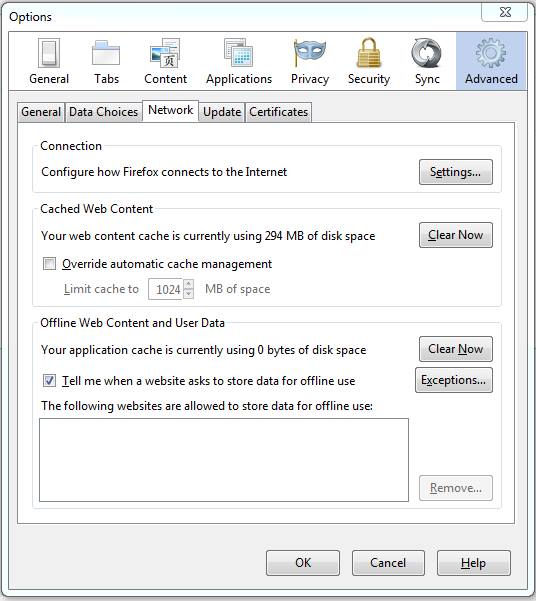
        Step 4 : Now you  have to change your Firefox browser proxy manually as shown in the below pictures,
        Go to Tools > Option> Advanced > network > Settings.

        How to Make Single Name Account on Facebook ? or How To Hide Last Name on Facebook ? ?

         click ' Settings ' and select " Manual proxy configuration: " - paste the proxy & port-8080 where you got from above 2 links-Proxynova.com or hidemyass.com and finally click OK in settings dialog box.

        Step 5 : Now open your Name settings. simply remove your last name or leave it as empty and then click ' Save Changes 


        Now your Facebook account is with first name without last name .


        Step 6 : Now Change back your Language settings from " Bahasa Indonesia " to " English ".


        Step 7 : After completing all steps remove ' Manual proxy configuration: '  in Firefox Settings and
         select " Use system proxy setting ".

        Note : You can make single name account only if your profile name limit is not exceeded.

        Wednesday, 25 December 2013

        Posted by Unknown On 22:12

        Salam From Mr-Crack & Haxor Farhan :)


        Hello guys  today i am going to give you an trick by which you can automatically wish your friends & family happy birthday on their birthday's .

        Instructions :-

        1 : Login to your Facebook Account .

        2 : Now open this app  Click here.

        3 : Now you will have to connect your Facebook account with this app  . See images Below


        4 : Now you can see an list of all your friends whose birthdays are coming . now you can schedule any message to them .

        5 : You can also edit the preferences like setting the time at which your Birthday wishes will be posted and your Email updates frequency. You can also delete your account from this menu if you decide to stop using birtdayFB.

        Tuesday, 24 December 2013

        Posted by Unknown On 07:51

        Salam From: Mr-Crack

        In this tutorial I will show you how to increase likes on your facebook  Page,picture,status and much more.

        Note: To make this trick work you have to follow all my steps otherwise wthe tricks will not work.

        Step 1 : Click Here And Like this Facebook Page.

        Step 2 : After Doing the above steps go to this website by clicking here.

        Step 3 : After signing up in this website add link of your facebook page,picture as shown in picture below.

        Step 4 : Now click Add URL . And now wait and enjoy.

        If any problem then feel free to comment below.